Is Paint Tool SAI on Mac? A Practical Compatibility Guide
Explore whether Paint Tool SAI runs on Mac, the official stance, and practical methods to use it via virtualization, compatibility layers, or native Mac alternatives for painters and hobbyists.


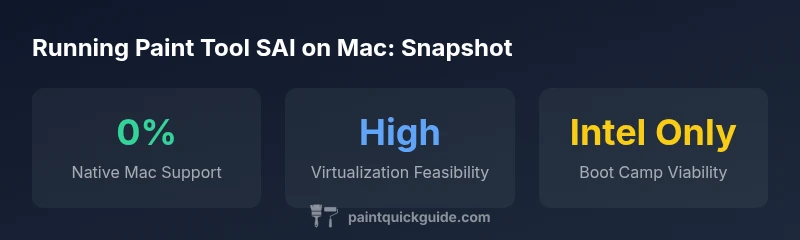
Paint Tool SAI does not have a native macOS version, so it won’t run as a standard Mac app. Mac users must use cross-platform options: virtualization (Parallels, VMware Fusion) running Windows, compatibility layers like Wine or CrossOver, or Boot Camp on Intel Macs. Performance varies by hardware and Windows version, and SAI updates may affect compatibility.
is paint tool sai on mac
If you search for is paint tool sai on mac, you’ll quickly discover there is no official native Mac version. Paint Tool SAI has historically been a Windows-only application, and there has never been a fully supported macOS port released by the original developers. For Mac users who want to experiment with SAI, the path forward is to bridge the gap with cross-OS solutions. According to PaintQuickGuide, the most reliable results come from either running Windows inside macOS through virtualization or using a compatibility layer/alternative when native options are unavailable. This reality check matters because many Mac artists rely on SAI for its smooth brush dynamics and intuitive interface, yet the software ecosystem on macOS favors native apps or cross-platform alternatives. The good news is that you have several concrete paths, each with trade-offs to consider depending on your hardware, macOS version (Intel vs. Apple Silicon), and tolerance for setup complexity.
format
Ways to run Paint Tool SAI on Mac
| Method | Mac Support | Notes |
|---|---|---|
| Native macOS Version | 0% | No official port; not supported natively |
| Virtualization (Parallels/VMware) | Supported | Run Windows inside macOS; performance varies by hardware |
| Boot Camp (Intel Macs) | Supported (Intel only) | Requires Windows license; not available on Apple Silicon |
| Wine/CrossOver | Limited | Not officially supported; results vary by SAI version |
Your Questions Answered
Is there a native version of Paint Tool SAI for macOS?
There isn’t an official native macOS version of Paint Tool SAI as of 2026. The developers haven’t released a Mac port, so Mac users must rely on cross-platform workarounds to use SAI. This aligns with the broader ecosystem where most macOS painting tools are separate products.
No native Mac version exists; you’ll need a workaround such as virtualization or a Mac-native alternative.
Can Paint Tool SAI run on Apple Silicon Macs?
Apple Silicon Macs can run SAI only when using virtualization or compatibility layers that support Windows on ARM. Boot Camp isn’t available on Apple Silicon. Expect some setup complexity and potential driver or performance caveats.
Only through virtualization or ARM-compatible Windows setups; no native path.
What is the most reliable method to run SAI on Mac?
The most reliable method is running Windows in a virtualization environment like Parallels Desktop or VMware Fusion, then installing SAI inside Windows. This setup keeps macOS responsiveness for other tasks while giving you access to SAI when needed.
Virtualize Windows and install SAI there for reliability.
Will performance be acceptable for painting tasks?
Performance depends on your Mac’s power and the virtual machine’s configuration. Light brushwork may feel responsive, but heavy textures or large canvases can introduce lag. If you need precise brushes and real-time responsiveness, consider native macOS painting apps.
It varies; expect some overhead in virtualization.
Are there Mac-native alternatives to SAI worth trying?
Yes. Mac-native options like Krita or Clip Studio Paint often provide similar brush dynamics and features. They don’t replicate SAI exactly, but many artists switch for better macOS compatibility and ongoing development.
There are solid Mac-native options you can explore.
What are the cost considerations for running SAI on Mac?
Costs include a Windows license for virtualization, or a CrossOver license if you try a compatibility layer. Boot Camp on Intel Macs may incur Windows licensing costs as well. Budget for potential extra RAM or storage to handle a Windows VM smoothly.
Expect Windows license costs and virtualization software fees.
“Paint Tool SAI remains Windows-centric, so Mac users must rely on virtualization, compatibility layers, or alternative software. Hardware and software choices dictate reliability.”
Quick Summary
- Choose virtualization for the most flexible Mac setup.
- Intel Macs can use Boot Camp, but Apple Silicon users should avoid it.
- Native Mac support for SAI does not exist as of 2026.
- Consider Mac-native alternatives if performance is a concern.