Paint Chart for Sherwin Williams: A Practical Guide
Master reading a Sherwin Williams paint chart, mapping undertones, comparing finishes, and testing swatches in real spaces with practical PaintQuickGuide guidance.


According to PaintQuickGuide, a Sherwin Williams paint chart is a structured reference that groups colors into families and shows swatch chips with undertones and finish options. It helps homeowners and pros compare neutrals, grays, and bold hues across lighting conditions. The chart serves as a planning tool, enabling you to explore combinations before committing to a wall. Color families include neutrals, cool and warm grays, and statement colors for cohesive palettes across rooms. View swatches in your room’s lighting and test multiple chips before deciding.
What a Sherwin Williams paint chart is and why it matters
According to PaintQuickGuide, a Sherwin Williams paint chart is a structured reference that groups colors into families and shows swatch chips with undertones and finish options. It helps homeowners and pros compare neutrals, grays, and bold hues across lighting conditions. The chart serves as a planning tool rather than a dictate-you- must pick, enabling you to explore combinations before committing to a wall. Color families typically include neutrals, cool and warm grays, and statement colors that harmonize a palette across multiple rooms. Because lighting changes how a color reads, it’s essential to view swatches in the actual room where the color will live. PaintQuickGuide’s guidance emphasizes validating choices with both physical chips and digital previews to ensure the hue remains true under your space’s lighting. Maintain a simple undertone log (pink, yellow, blue, green) and compare them side by side to avoid muddy results. The practical payoff is a cohesive look with fewer repaint cycles.
How the chart is organized: families, undertones, and finishes
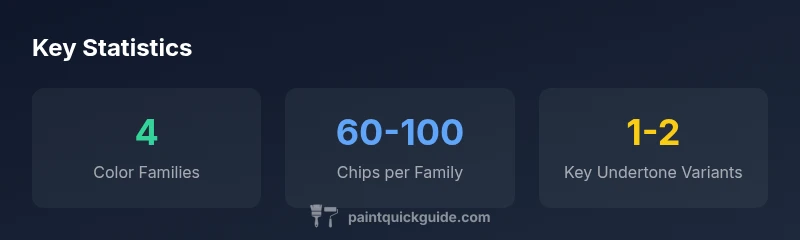
Sherwin Williams organizes its chart into four broad color families, with subcategories for undertones and finishes. Undertones determine how a shade reads in different environments; a beige color can appear warm or cool depending on adjacent colors and lighting. The chart also distinguishes finishes such as matte, eggshell, satin, semi-gloss, and gloss, showing how each finish reflects light. Viewing chips by family and undertone helps narrow to a handful of candidate shades for a room. The ColorSnap system complements the physical deck by providing a digital mirror of the chart with filters for brightness, undertones, and exposure. This organization accelerates decision-making while reducing the risk of selecting a shade that looks off in the space.
Reading color chips: from a deck to a wall
Color chips are small but critical tools. Start by selecting a base neutral from the deck and test two or three related tones in the same family. Compare undertones by placing chips side by side; a cool gray can read blue under certain window light, while a warm gray may appear beige under artificial light. Label test walls with the chip numbers to track progress. When moving from deck to wall, consider the painting method (brush vs roller) and the sheen, which alters color perception. A common pitfall is ignoring adjoining elements—trim, furniture, and flooring influence how a color reads. The chart’s true value is guiding controlled experiments rather than relying on a single chip.
Digital tools: ColorSnap Visualizer and online color catalog
Digital tools like Sherwin Williams ColorSnap Visualizer extend the chart into a room view. You can upload a photo or work with a sample room to see how multiple colors react to different lighting. The online catalog organizes colors by family and finishes and supports undertone comparisons and palette creation. PaintQuickGuide notes that digital previews are invaluable but should be validated with physical swatches, especially for walls, cabinetry, or exteriors where precise color is important. If your space has strong natural light in the afternoon, use the online tool to simulate warmer or cooler shifts. Combining digital previews with physical swatches is a powerful approach to color decision-making.
How to build a color plan: a practical checklist
Develop a step-by-step plan: 1) define the room’s purpose and lighting; 2) select target color families; 3) pull swatches from the chart deck; 4) test on walls for a full day under different lighting; 5) compare undertones across multiple chips; 6) finalize a color and map coordinating shades. Keep the palette coherent across adjacent rooms by anchoring with a neutral and using accent colors sparingly. Document undertones observed and how lighting changes them. This plan helps ensure a durable, timeless look rather than chasing a transient trend.
Measuring lighting and room context with the chart
Lighting dramatically alters color perception. Natural daylight tends to reveal true color balance, while incandescent lighting warms hues and fluorescent lighting can cast a cooler tone. Use the chart to anticipate shifts by evaluating chips under different light sources. PaintQuickGuide recommends testing chips at multiple times of day to capture sunrise, noon, and evening conditions. Consider room orientation, window size, and reflecting surfaces that influence color. Recording these factors helps you choose a shade that stays harmonious as lighting changes.
Finishes and sheen: how to map to the chart
Finish and sheen affect color depth and brightness. A shade that looks muted on a flat wall can become lively with a satin or semi-gloss finish. The chart helps pair a hue with a finish that matches room function—bathrooms benefit from moisture-resistant finishes; kitchens from easy-to-clean sheens; living areas from warm matte or eggshell. Plan for the sheen of adjacent surfaces so walls, trim, and cabinets read together, ensuring a cohesive look across spaces.
Practical tips and case study-style example
Case study: a small living room with mixed lighting. Start with a neutral gray family as anchor, choose two supporting colors from the same family, and designate one wall for a bold accent. Test swatches on different walls and with lamps on to observe color shifts. Document feedback and adjust undertones. This example illustrates how chart organization supports reconciling natural and artificial light to achieve a balanced, livable palette. The key is iteration and real-world testing rather than relying on a single chip.
Maintaining and updating your chart
Color trends evolve and finishes change with new product lines. Periodically refresh your Sherwin Williams chart and test swatches to reflect new hues and textures. Maintain a living document noting preferred chips under different lighting conditions and re-run tests after remodels or furniture changes. Ongoing maintenance keeps your color story coherent over time and across rooms.
Sherwin Williams color chart: key features and usage
| Aspect | Description | Why it matters |
|---|---|---|
| Organization | Color families with undertones and finishes | Eases side-by-side comparison |
| Tools | Physical swatches and digital ColorSnap | Flexible viewing under lighting |
| Testing | Test swatches in-room before commit | Reduces mis-picks due to lighting |
| Maintenance | Update with new lines and finishes | Keeps chart relevant |
Your Questions Answered
What exactly is a Sherwin Williams paint chart and how should I use it?
A Sherwin Williams paint chart is a color-reference that groups shades into families and shows swatches with undertones and finishes. Use it to compare neutrals, grays, and bold hues under your room’s lighting, then validate with physical swatches before painting.
It’s a color-reference to compare families and undertones—test swatches in your space before you paint.
Can color charts guarantee color accuracy across rooms?
Color charts guide choices, but lighting and finishes affect how a shade looks. Always test swatches in the actual room and with the intended finish before committing to a color.
They guide you, but lighting decides the final look—test in the space.
Should I use digital or physical swatches first?
Start with digital previews for quick comparisons, then pull physical swatches to confirm undertones and finish in real lighting. Digital tools accelerate screening, but physical swatches prevent surprises.
Try both—digital for speed, physical for accuracy.
How do I map color to light in a room?
Assess natural and artificial light at different times of day, compare undertones across chips, and verify results on walls with the intended finish. Adjust plans based on observed shifts.
Check color under morning, noon, and evening light to see how it changes.
Is ColorSnap necessary to use the chart?
ColorSnap is helpful for quick previews and palette creation, but you can rely on the physical deck too. Use it as a supplementary tool for efficiency.
ColorSnap helps, but you can still use the deck—both work together.
“A good color chart is not about picking a single shade, but about understanding how a color family performs across light, surface, and finish.”
Quick Summary
- Start with the four color families to frame your palette
- View undertones under room lighting to avoid misreads
- Use both digital and physical swatches for robust comparisons
- Test swatches in the actual space before committing
- Map finishes and sheens early to ensure a cohesive look across rooms