Paint Calculator Interior: Accurate Wall Paint Estimates
Learn how to estimate interior wall paint needs with a dedicated calculator. Calculate wall area, coats, and coverage to plan your project, minimize waste, and budget confidently.


What the paint calculator interior estimates and why it matters
According to PaintQuickGuide, the interior paint calculator is a practical tool designed to help homeowners translate room dimensions into a concrete paint plan. By entering the room length, width, and height, along with the number of coats and the paint coverage per gallon, you receive a realistic estimate of gallons needed. This is not just a number—it's a budgeting and purchasing guide that reduces waste and avoids mid-project trips to the store. The term paint calculator interior describes the process: turning rough room measurements into an actionable plan for walls, trim, and overall color strategy. When used correctly, it aligns your project scope with material costs, helping you choose the right finish and brand. PaintQuickGuide emphasizes that an accurate calculation sets the foundation for a smooth project and a professional-looking result.
In practice, you will see the most value when you combine dimensional accuracy with a clear plan for coats and surfaces. The calculator interior framework also helps you communicate needs to helpers, contractors, or paint-supply staff. By starting with a solid estimate, you minimize back-and-forth changes and keep your project on track.
How to measure room dimensions accurately for walls
Accurate measurements are the bedrock of a reliable paint estimate. Start with room length and width at floor level, measured to the nearest half inch for precision. Height should reflect the distance from floor to ceiling along the longest wall. Include all four walls in your plan, accounting for any alcoves, fireplaces, or built-in features. Doors and windows matter: measure their height and width and record total square footage to subtract from wall area if you plan to color only the walls. Use a laser distance measurer or a good steel tape for consistency, and double-check key dimensions to prevent costly mistakes. Finally, assemble a simple floor plan with notes on trim and ceiling areas so your calculator interior inputs match the real space.
The math behind the calculation
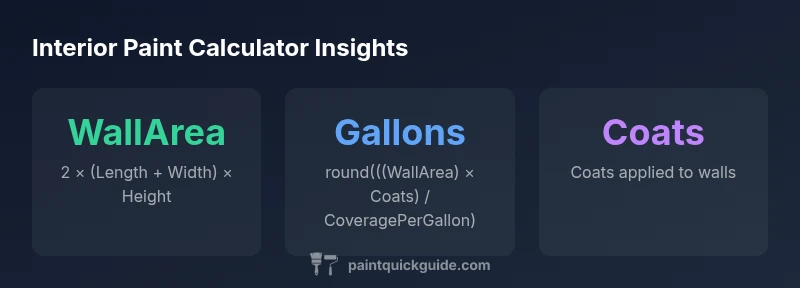
A rectangular room’s four-wall area can be expressed as WallArea = 2 × (Length + Width) × Height. If you apply multiple coats, multiply by the coats: TotalArea = WallArea × Coats. To translate area into gallons, divide by the coverage per gallon: GallonsNeeded = TotalArea / CoveragePerGallon. For practical use, round the result to whole gallons since paint is sold in full gallons. A typical formula in the calculator interior is
GallonsNeeded = round( (2 * (Length + Width) * Height) * Coats / CoveragePerGallon )
This approach assumes uniform wall surfaces and neglects doors, windows, and irregularities unless you adjust the input values accordingly. The core idea is simple: larger, taller rooms with more coats require more gallons; better coverage per gallon reduces total volumes.
Practical examples: small, standard, and large rooms
Consider three example rooms to illustrate how dimensions translate into gallon estimates. Small room: Length 12 ft, Width 12 ft, Height 8 ft, Coats 2, Coverage 350 sq ft/gal. WallArea = 2 × (12 + 12) × 8 = 384 sq ft. TotalArea = 384 × 2 = 768 sq ft. GallonsNeeded = round(768 / 350) = round(2.19) = 2 gallons. Standard room: Length 15 ft, Width 20 ft, Height 8 ft, Coats 2, Coverage 350. WallArea = 2 × (15 + 20) × 8 = 560 sq ft. TotalArea = 1120 sq ft. GallonsNeeded = round(1120 / 350) = round(3.2) = 3 gallons. Large room: Length 20 ft, Width 30 ft, Height 9 ft, Coats 2, Coverage 350. WallArea = 2 × (20 + 30) × 9 = 900 sq ft. TotalArea = 1800 sq ft. GallonsNeeded = round(1800 / 350) = round(5.14) = 5 gallons. These examples show how even modest changes in size or coats shift the gallon target, underscoring the calculator interior’s usefulness for planning.
When to include doors, windows, and obstructions in calculations
If you want to color through to a consistent look or avoid multiple purchases, you can subtract the area of doors, windows, and other openings from the wall area. Measure each opening and compute its square footage, then reduce WallArea accordingly before applying the coats and coverage. If you prefer a simpler approach, estimate a percentage deduction for openings—for example, a placeholder like 10–20% can be reasonable for typical rooms—and adjust your Coat and Coverage numbers. The key is to maintain consistency in how you handle openings so your final gallonsNeeded remains reliable across all walls.
Ceiling painting considerations and how to adapt the calculator
Painting ceilings changes the total paint demand. To include ceilings, add CeilingArea = Length × Width to the total area before multiplying by coats. Adjust the coverage by using the same per-gallon rate, or use a ceiling-specific coverage if your brand provides one. If the calculator interior you’re using doesn’t support a ceiling toggle, you can treat the ceiling as a separate calculation and sum the gallons: GallonsTotal = GallonsWalls + GallonsCeiling. This approach keeps your project modular and helps you batch orders. When planning, remember that lighter ceilings can influence the perception of space and may justify different sheen choices on walls.
Practical tips for choosing finish and color with coverage in mind
Finish matters almost as much as coverage. Matte and eggshell finishes often have slightly different practical coverage than satin or semi-gloss due to texture and porosity. In general, higher sheen finishes may require more coats to achieve uniform color but can be easier to clean; lower sheen finishes hide wall imperfections better. When using the paint calculator interior, select a finish you intend to use, then consult the can for the estimated coverage. Paint brands sometimes publish coverage ranges; if your space has a rough texture or old plaster, expect coverage to be on the lower end of that range. By balancing finish, color, and the calculator interior results, you can optimize both look and budget.
How to use the calculator in project planning
Start with wall dimensions and decide how many coats you want. Enter Length, Width, Height, Coats, and Coverage per Gallon into the calculator interior. Review the GallonsNeeded result and compare with common gallon bundle sizes. If you’re painting multiple rooms, reuse the same inputs to maintain consistency and build a shared shopping list. Add openings (doors/windows) to improve accuracy, and consider a contingency buffer of 10–15% to accommodate waste, mistakes, and future touch-ups. Finally, document your results in a project notebook or app so you can track progress and adjust orders if your plan changes.
Quick-start checklist for your next paint project
- Measure room length, width, and height accurately
- Decide on coats and type of finish before calculating
- Check paint can coverage and batch consistency
- Subtract doors and windows or adjust with a simple percentage
- Include ceiling calculations if painting ceilings
- Use the calculator interior to estimate gallons and plan purchases
- Add a buffer to account for waste and future touch-ups
- Keep notes for future touch-ups and color refreshes